
[MIT 6.s081] Xv6 Lab 10: File System Record
The content below was generated entirely by machine translation. Please verify its accuracy. If anything is unclear, consult the Chinese source version.
Update on 2022/9/14: I recently put the lab code on GitHub. If you need a reference, you can find it here:
https://github.com/ttzytt/xv6-riscv
The different branches contain the different labs.
Lab 10: File System
Large files
Description
In xv6’s underlying implementation, a file is described by struct dinode, as follows:
1 | struct dinode { |
Here we mainly care about the addrs field in this structure. It records the actual storage locations of the file. The first twelve entries of addrs point directly to blocks that store file data. The final entry is an indirect block: the block to which it points stores other pointers, and those pointers in turn point to the blocks that actually store the data. This may sound rather convoluted; it looks approximately like the following diagram:
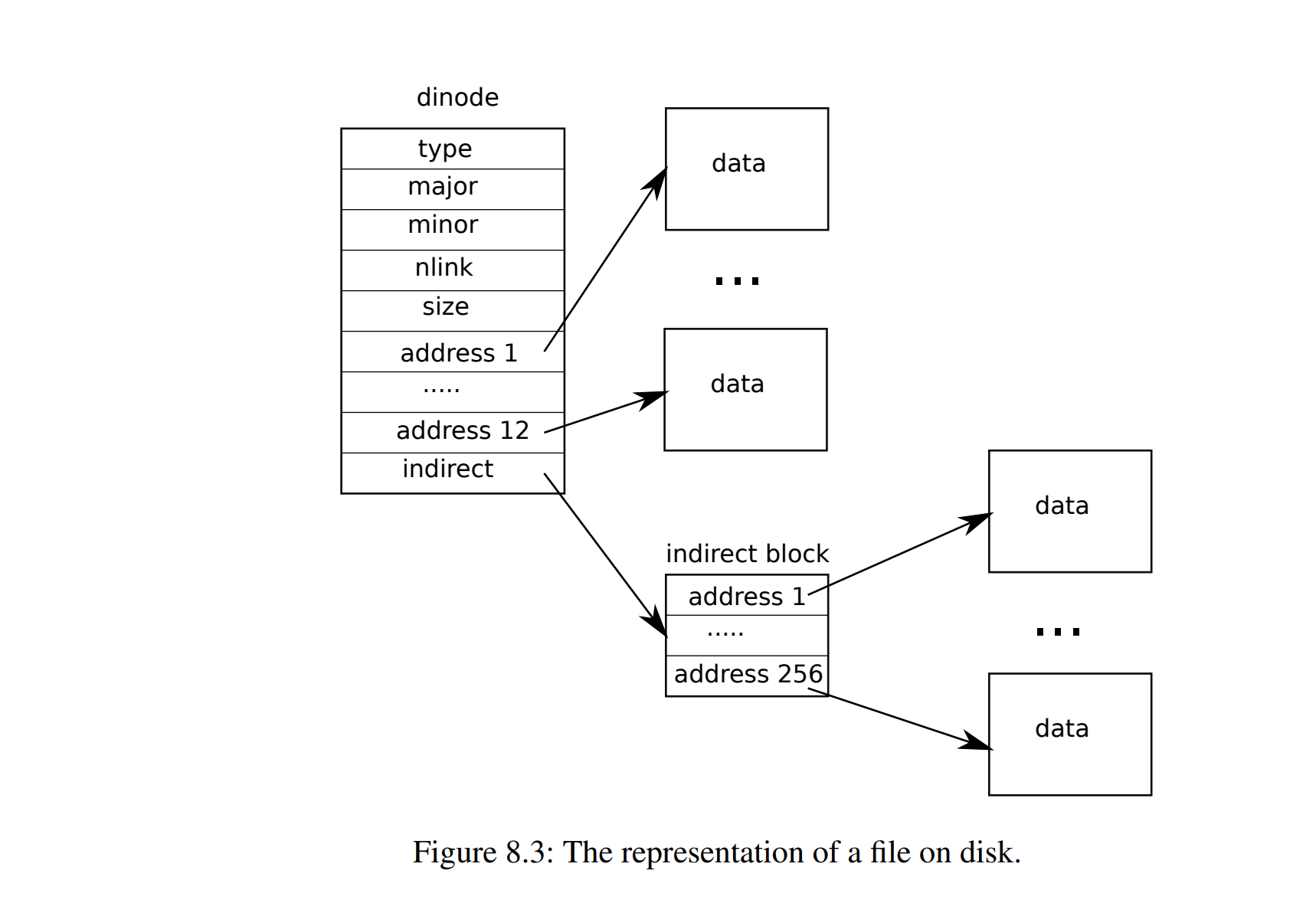
We can calculate the maximum file size supported by xv6. A struct dinode occupies 64 B, and one disk block can store 1024 B of data.
The first twelve direct entries of addrs can therefore address of data.
The final indirect pointer points to a block filled with pointers to other disk blocks. That block can hold addresses.
Each address identifies an entire block, so this indirect entry of addrs supplies of storage.
Together they provide , which is .
This capacity is obviously very small. In this lab, we therefore need to add a doubly indirect block pointer to the inode.
A singly indirect block pointer is the last addrs entry just described: it points to a block, and the block pointers stored in that block point to the actual data blocks.
With a doubly indirect pointer, each pointer in the block addressed by addrs points to another block that stores pointers. This increases the available storage, somewhat like a multilevel page table, as illustrated below:
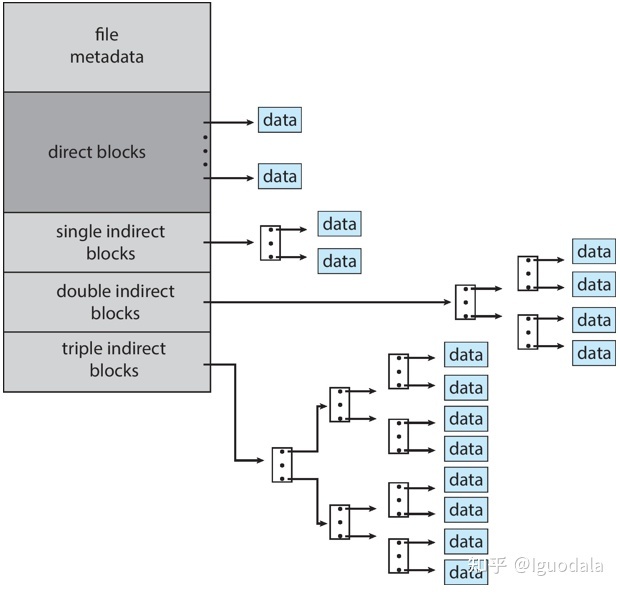
We can calculate the capacity supplied by this doubly indirect pointer. One block holds 256 block pointers, so the block addressed by addrs can contain the block numbers of 256 pointer blocks. The total is therefore blocks. At 1024 bytes per block this is 64 MB, a very substantial increase.
Approach
We need to modify the two functions bmap() and itrunc(). There is nothing particularly difficult to reason about, so I leave the detailed explanation in the code section.
Code
Because a doubly indirect index has been added, several macro definitions must first be changed:
1 |
We must also modify struct dinode and struct inode. A dinode is stored on the disk itself, while an inode adds metadata to the dinode representation to make inode processing more convenient:
1 | //in fs.h |
1 | // in file.h |
bmap():
This function accepts an inode pointer and bn, where bn means the index of a block within that inode, and returns the corresponding block number.
We need to add support for doubly indirect blocks to this function. To obtain a second-level indirect block, we can first obtain the corresponding first-level indirect block.
Much of the code can follow the existing handling of the singly indirect block.
1 | // in fs.c |
itrunc():
This function clears every block belonging to an inode; it can also be understood as deleting a file. Internally, it repeatedly calls brelse() and bfree().
Here, brelse() releases a cached block, while bfree() releases a disk block by modifying the data in the disk’s bitmap block.
As with bmap(), much of the implementation can follow the singly indirect index. The main idea resembles recursion: traverse every first-level block, check whether it contains data, and, if it does, traverse the second-level blocks referenced from it.
1 | // in fs.c |
Symbolic links
Lab description
This exercise asks us to implement symbolic links, also called soft links. To be honest, I am still not completely clear about the essential difference between soft and hard links. A symbolic link is somewhat like a shortcut in Windows.
The implementation is actually simple. However, the hints supplied by this lab were not sufficient for me, so I was rather confused while doing it and eventually finished only after reading someone else’s blog.
First, a symbolic link is like a “pointer” to a file. When we open a symbolic link, the file to which it points is what actually gets opened. This lets a path in one directory open a file that is physically stored in a different directory.
Approach
How should this symbolic link be implemented? A symbolic link is itself a file. We only need to store the path of its target file in that file—or, more precisely, in its inode.
To achieve link following, open() must use the stored path to recursively find the final target file, because one symbolic link may point to another symbolic link.
But what if we want to open the symbolic link itself? That requires a new open() flag. Such flags specify settings for opening a file descriptor. We can add an O_NOFOLLOW flag meaning that the path stored in a symbolic link should not be followed recursively and that the link itself should be opened.
1 | //in fcntl.h |
An inode is an abstraction over the various kinds of data stored on disk. To determine what an inode actually contains, we also need to define a new inode type:
1 | //in stat.h |
One annoying detail in this exercise is that the sys_symlink() system call has not already been registered. As in Lab 2, it must be added to the various relevant files. I assume readers of this article have completed Lab 2, so I will not repeat that process. If you have not, see this article.
Code
sys_symlink():
As described above, a symbolic link is essentially a kind of file, but that file is itself represented by an inode. While writing the code, remember that all these operations are performed on an inode. In addition, all file-related system calls must be enclosed by begin_op() and end_op(). This means that every operation in that interval is first recorded in the logging system. For background, refer to the xv6 book and lectures.
1 | uint64 sys_symlink(){ |
sys_open():
The following code at the beginning of sys_open() opens or creates the inode corresponding to the path supplied by the user and stores it in ip. The later code in sys_open() processes this ip to finish the open operation, but we do not need to consider that part yet.
1 | \\ in sysfile.c |
For a symbolic link, the ip corresponding to the path supplied by the user is not the inode the user ultimately wants to open. We therefore need to follow the files referenced by symbolic links recursively and update ip. Note that the final ip must remain locked.
The code is as follows and is added after the preceding block:
1 | \\ in sysfile.c |
There is one particularly important detail here. While following symbolic links recursively, we need to stop when we reach a file that is not a symbolic link. This requires access to the inode’s type field. The check of this field must occur after ilock(ip). It took me a long time to discover this bug.
First, examine the code for ilock():
1 | // Lock the given inode. |
The function first checks ip->valid. This valid field indicates whether the current inode’s data has been loaded from disk. If it has not, the function reads the disk first and loads the data into this inode.
In other words, accessing an inode before calling ilock() means the inode may still be empty, so the values read from it naturally have no meaning. This also reminds us once again that shared data accessed between threads must be locked.
After finishing these changes, the lab can finally pass. I also wish everyone working on this lab an early AC:
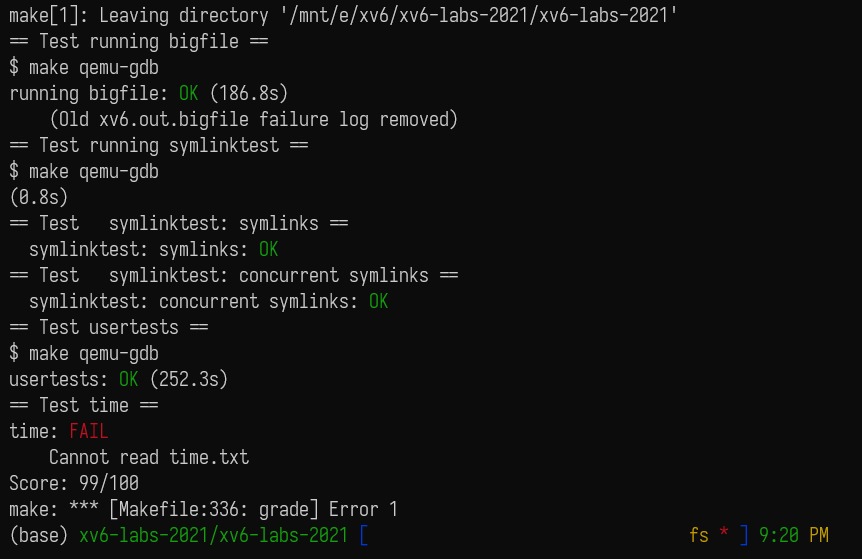
One reminder: if your tests run successfully in QEMU but make grade still fails, the likely cause is a timeout—perhaps my computer is simply too slow. In that case, increase the time limit in the Python grading program grade-lab-fs.
Summary
Array out-of-bounds errors and memory leaks are truly terrifying. The actual defect may have no apparent relationship whatsoever to the error reported by the system, making it nearly impossible to debug.
I will briefly describe some exceptionally foolish mistakes I made while doing this lab. The worst part is that debugging them consumed two entire afternoons.
At first, symlinktest caused a panic whose message was virtio_disk_intr status. I certainly did not know how to deal with something involving a virtual disk, so I stepped through the program and located the exact operation in symlinktest where the problem occurred:
1 | r = symlink("/testsymlink/4", "/testsymlink/3"); |
Here, symlinktest panicked immediately after calling close(fd2).
I stepped through it again and found that the call sequence when the failure occurred was approximately:
1 | sys_close() -> fileclose() -> iput() -> itrunc() -> bread(): |
I assumed that I had written itrunc() incorrectly. I even created a new branch and copied someone else’s itrunc(), but the problem remained.
Then I wondered whether it was some inexplicable issue, so I simply commented out that panic(). A new panic appeared, this time reporting freeing free block:
1 | static void |
Later, I also found that itrunc() had not released the singly indirect index blocks at all and instead attempted to release the doubly indirect index immediately because addrs[12] was nonzero. That made no sense: the singly indirect capacity should be exhausted before the doubly indirect index is used. Combined with the freeing free block panic, this made me fairly certain that some kind of out-of-bounds access was responsible.
Eventually I discovered that the problem was actually in struct inode:
1 | struct inode { |
I had changed addrs[NDIRECT + 1] to addrs[NDIRECT + 2] in dinode, but had forgotten to make the same change in inode.
Consequently, when I accessed addrs[12], I was actually accessing the dev field of the next inode. Things then became absurd: how could an inode’s doubly indirect index block possibly be block number one, the superblock?
I am actually curious why itrunc() did not free the superblock and exactly how this caused the virtual-disk panic. I am too tired to debug it further, but anyone interested can investigate.
That is enough. This completely broke me.



![[Stanford CS144] Lab 4 Record](/img/CS144/tcp%E7%8A%B6%E6%80%81%E6%B5%81%E8%BD%AC%E5%9B%BE.jpg)
![[Stanford CS144] Lab 0–Lab 3 Lab Notes](/img/CS144/sponge%E7%BB%93%E6%9E%84%E5%9B%BE.svg)